 |
|||||||
|
|||||||
Four
years of remote DX
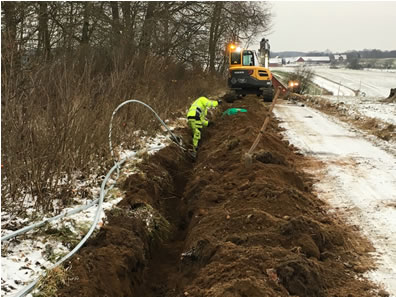
It's worked out just fine, as long as I was happy to use it all on site. In summer everything was fine, as we normally spend our time at the country location. In winter, I wanted a more flexible solution. It was not perfect to go by car one hour to fetch a lot of DX recordings. To do that turned out more difficult than expected. For one reason: you have to move enormous amounts of data. One night's recording easily ends up at 40-50 Gigabytes, for a single SDR. So many experienced remote DXers usually listen to all recordings on the remote computer and record interesting snippets, which can then be transferred to the home computer. But if you, like me, have four SDR receivers connected to two different computers, it gets messy. Better then to have everything on a large hard drive at home, so that everything can be run together, compared and then deleted. The problem is how to move these huge amounts of data. Quickly. It is not that nice to have to wait several copying hours in a poorly heated room. Sure, you can record directly to USB disks, which you can then easily change. But that brings other problems in the form of shakier USB technology, not least on older computers with only USB2. It is usually more stable and faster to use internal hard drives, especially if you run unattended reception all year round. So the first solution was to get USB3 cards for the computers, to reduce the copying time from like three hours to 30 minutes (USB2 can handle 30 MB/s while USB3 can transfer 110 MB/s). For a while I tried a server computer's quick change of the internal hard drives, which I then connected via USB to my desktop at home. It worked, but was very unstable. After three crashed disks, which then had to be reformatted, that solution was abandoned. The second solution was "fixed mobile broadband". Instead of going by car to copy and download files, computers and networks should fix it; and it worked delightfully well. To a certain limit. It is possible to control the computers remotely using online services such as Teamviewer, Splashtop or, in my case, Anydesk. However, moving files is slow, so it was back to square one and speeds of the 1980s. It turned out that the phone comapny's fancy coverage map for 4G only refers to mobile phones. When it comes to more pure data transmission in our sparsely populated area, 2G applies -- meaning that there will be no promised 150 megabits in transmission speed, but only 25 megabits at best. Next level: fibre broadband. With 500 gigabits for both upload and download, any copying problems should be out of the world, I thought. But not. Instead, a number of other bottlenecks emerged: It does not work well with WiFi, which is too slow. Cables must be drawn to a local network, which is then connected to the fiber network. The parts of this LAN must have the gigabit standard, not least the router and switches. (And here it is important not to be confused by the internet world's mbps, megabits per second, and the more commonly used MBps, megabytes per second. The difference is roughly 8:1, so a standard 100 mbps network can move data at a maximum of 12.5 MB/s .) The computers should also have the gigabit standard, but most older computers (like mine) only have 10/100 megabits network cards. Still, that should give close to 12.5 MB/s data transfer. But not. No matter what I tried with my Anydesk solution, I couldn't get more than 5MB/s. Sure, double the mobile broadband's 2 MB/s, but half of what it should be. It now appeared that Anydesk's personal, free solution has been throttled; controlling the computers remotely is delightfully easy, but not copying files. An attempt at Splashtop was even more disappointing. Their $17/year "Personal" solution does not allow file transfer (and appears to be only available in the US). If I want file transfer, they answered my question, I will have to use a European "Business" solution for 90 euros a year. The rescue was found in Google, where a search for "anydesk low transfer speed" revealed that everybody was complaining about commercial services. While said to be free for private use, most are just marketing lures to make us pay dearly. "Use Rustdesk," was the advice. Rustdesk is basically the same thing, but open source and therefore completely free, without commercial restrictions and fully customizable. You can even set up your own server, but the easiest way is to choose "portable". Then it's just a matter of starting the program on both the local computer and the remote computer, and start copying. Immediately I got full speed on the transfer of files, i.e. 11 MB/s. With a one gigabites network card I get 60 MB/s transfer speed but, alas, that is now limited to 30 MB/s as my download speed at home is 250 gigabites. So now I am considering faster internet services, new network cards of 2.5 gigabits, or new computers. It never ends. |

|
||||||
|
|
|||||||
 Skånska
landskap Skåneleden
Vargrevir
Degeberga
antikmarknad Stenshuvud
Naturreservat Skånska
landskap Skåneleden
Vargrevir
Degeberga
antikmarknad Stenshuvud
Naturreservat
|
|||||||
 SDR
Console
SDR
Console