|
How to
run lots of SDR's with remote control
Here, on this website, you will find nothing about connecting to a lot
of remote receivers around the world,
This is just my story on how to set up and use remote solutions between
a city home and our countryside residence, what in Sweden is called
a "torp" (croft, smallholding). Thus DX-Torpet.
And how you could do it yourself -- but Should
we still call it DXing?
|
|
|
Hardware
Many years
of remote DXing
For several years I happily used older computers to run two, three or
more SDR receivers on one PC. All on site, in the summer.
But in winter I needed a remote solution, to avoid the two hour trips
to fetch DX recordings. Not that easy, and this is how
to do it.
Bottlenecks
in high speed data transfer
There are a lot of bottlenecks if you want to transfer a lot of SDR
recordnings. Those files are huge. This is what you need
to know.
Which computer for which radio?
Modern radio is all about SDR, meaning that the "radio" is
more Windows than radio (Mac users is in trouble, Linux users are fine
with necessary programming skills).However, which PC to choose is not
that straightfoward...
Bjarne
Melde on ArcticDX: "Don't buy a Windows PC running on
Snapdragon for use with SDRs unless you have checked hardware
compatibility."
Auto restart PC after power failure
After a power failure, or any Windows mess up, it is very nice to have
all your computers and SDR's restart automatically. It can be done,
like this.
What SDR is using what on my computer??
 Running
more than one SDR on any computer can be frustrating... before getting
it to work properly. Running
more than one SDR on any computer can be frustrating... before getting
it to work properly.
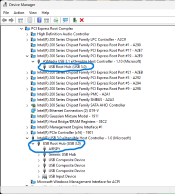
What is using what, and how to find bottlenecks, one good start is already
available:
In Window's device manage
select "View --> Devices by Connection". You will see the
complete hierarchy and which root hub you are connected to if you have
more than one.
If you only have one root hub you're not able to run many SDR´s
with huge bandwidths, say 10 MHz. Simple arithmetic is against you if
you try to work off a single controller, aka root hub, due to
USB limitations. Your motherboard documentation may tell you if you
actually have multiple root hubs or not.
So while USB is easy to use, its capacity is limited. To learn more:
www.elprocus.com/usb-protocol/
|
 |
Software
SDR
Console -- a must
This is a first class SDR tool. It has everything you need to get the
most out of almost any SDR receiver. The setup for recording I find
somewhat awkward, but its filters and audio quality makes it a superb
play back machine for any recorded IQ file.
Smart Console ways
for FM DXers
HDSDR
-- a good start
Good old HDSDR is, probably, the best way to start with SDR receivers.
It is fairly easy to use, covers just about every SDR with plenty of
extensions and has tne best recorder, which is why I use it every day.
SDR#
-- not that sharp for everybody
SDR# is the perfect companion for Airspy receivers. Work great with
others too, but not the most user friendly software.
Preamp on an Airspy?
Forget it!
How to check for
audio problems
More useful notes
SDRSharp
Big Book v5.5 - big PDF-file
Jaguar
-- a tough beast to tame
Some highly devoted MW DXers use Jaguar, a specialized software for
the Perseus SDR.
A great application, but it is also a difficult beast to tame -- not
least as the Jaguar's master, Ilpo Parviainen, insists on changing a
lot of things constantly. So if you don't have a Perseus (first version)
and are not entirely into MW DXing, this is not for you.
Best
MW recorder for Perseus SDR
With minimized resource usage, auto restart after power
failures, running two Perseus on one PC, and antenna switching, this
free
KIT recorder is the best MW recorder ever. Reccordings can
played back in Jaguar, HDSDR and SDRConsole.
KIT
v2 manual
- PDF
file
Jaguar
on none-Perseus receivers
Jaguar is as closely integrated with the Perseus SDR as you can ever
imagine. But you can use recordings from other SDR´s, mainly those
from SDRplay. This
is how you do that.
Altering timestamp In Perseus IQ .WAV files
Occasionally someone has the need to change the time of the recording,
possibly because their computer clock was off when the recording was
made. This can be easily done if you don't mind some byte twiddling
in a hex editor.
This
is how you do that.
|

 Skånska
landskap
Skånska
landskap 
 SDR
Console
SDR
Console