KIT,
the perfect Perseus recorder
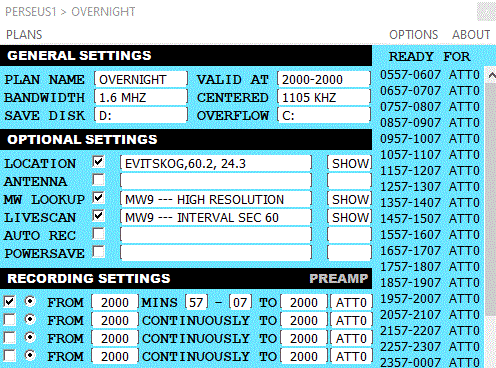 The
easist, most efficient way to record with a Perseus is to
use Jaguar's
free KIT recorder. It is easy to set up, it works flawlessly,
and no strain on your computer as you don't have to run the whole Jaguar
caboodle.
Jaguar master coder Ilpo Parvianen explains:
"Jaguar KIT was created as an alternative to the low end PC devices,
while still keeping the compatibility with the big application."
"However, it seems that folks prefer using the full Jaguar version
even on the low end PCs. But most users wants to produce all those SCANs,
YAS LOGs, collect SOLAR DATA, and so on."
Fine,
but if all you want
is smooth, small and simple, go with KIT. [Download]
You cannot find any better, easier, and leaner application for Perseus
recordings than this one -- if what you really want is recordings, remotely,
all to be replayed later on another, full, Jaguar setup at home.
The KIT's simplicity and low PC demands makes it a winner, especially
as the main Jaguar application is getting bigger and bigger with new
features.
And you can make it run two Perseus SDR's on one PC.
Awesome.
To run
KIT, all you have to do is download the application.
Then run it, and you're in business.
Well, sort of, because with anything Jaguar it may take some time to
figure out what is what, ad why. But stick to it, and you will be happy
that you did.
TWINKIT
gives you two Perseus on one PC
Running
two Perseus SDRs on one PC is easier than you can imagine:
You just have to rename your KIT folder to TWINKIT.
That's it -- well, besides from having two different Perseus SDRs connected.
Now, when you start KIT, you will see two KIT bars on the top of the
screen and you can operate both independently.
No other software that I know can do this.
But all is not that rosy...
The first problem is to find out
which Perseus runs what. With newer SDR's, such as Airspy, each receiver
has its own ID, That is not the case with Perseus, or rather, the receiver
do not tell Windows which one is which.
Now that is not as big a problem as one might fear, as Windows 10 keeps
track on applications started, remembering the start order from reboot
to reboot. So when setting up the two different SDR's, all you have
to do is keep an eye on the receiver LED's (to know what KIT start which)
and the configure it as needed. After that, forget about it. Windows
will keep track.
The second problem is also computer
related:
You may get some HANGS, meaning that all received data can stress the
USB processing.
"TWINKIT may stress the USB system. This is an area which is not
supported by Nico's API, and the only thing I can do is to detect that
kind of situation and force KIT to make a restart", says Ilpo Parvianen.
And when the HANGS hit you, the KITSAVER solution will restart the application
by itself -- after a while.
Meaning that you may perhaps miss the DX of your lifetime.
Which is why most Perseus user only have one SDR on one PC.
But two on one can be done.
|

|

 Skånska
landskap
Skånska
landskap 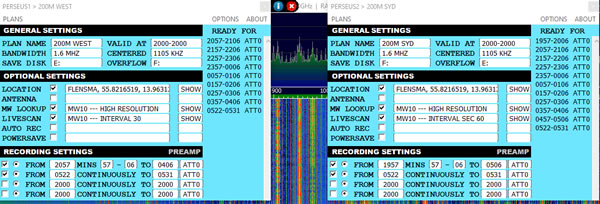

 SDR
Console
SDR
Console